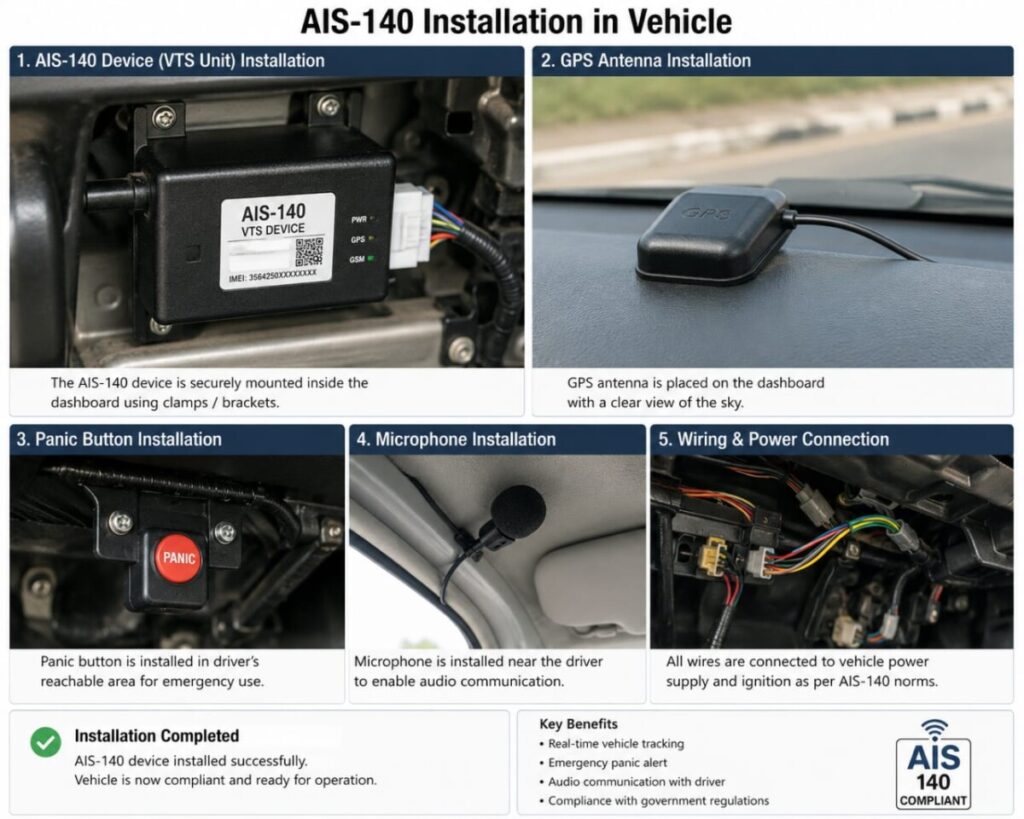
AIS-140 GPS Installation Process
AIS-140 is a government-approved vehicle tracking system mandated for commercial and public transport vehicles in India. The device provides real-time vehicle tracking, emergency alerts, route monitoring, and compliance with transportation regulations.
Step 1: Vehicle Inspection
Before installation, the technician inspects the vehicle to identify suitable mounting locations and power connection points. The installation plan is prepared according to AIS-140 guidelines.
Step 2: Device Placement
The AIS-140 GPS tracking device is securely installed in a concealed location within the vehicle, typically beneath the dashboard or behind interior panels. The location should ensure protection from moisture, vibration, and unauthorized access.
Step 3: Power Connection
The device is connected to the vehicle’s electrical system:
-
Red Wire → Vehicle Battery Positive (+)
-
Black Wire → Ground/Negative (-)
-
Ignition Wire → Ignition Detection Input
All wiring connections are properly insulated and secured to ensure reliable operation.
Step 4: GPS & GSM Signal Verification
After powering the device, GPS satellite connectivity and GSM network signals are checked to ensure accurate vehicle tracking and uninterrupted data transmission.
Step 5: Panic Button Installation
As per AIS-140 requirements, emergency panic buttons are installed at accessible locations inside the vehicle. These buttons allow passengers or drivers to send emergency alerts when required.
Step 6: Integrated Camera & Accessories
Additional accessories such as cameras, fuel sensors, RFID readers, or driver identification systems are installed and integrated with the AIS-140 tracking unit when required.
Step 7: SIM Card Configuration
A valid data-enabled SIM card is inserted into the device. Network settings and server configurations are updated according to the service provider’s specifications.
Step 8: Device Registration
The GPS tracker’s IMEI number, vehicle details, and SIM information are registered on the monitoring platform and linked to the vehicle.
Step 9: Functional Testing
The technician verifies:
 GPS Location Tracking Ignition Status Monitoring Panic Button Functionality Real-Time Data Transmission Vehicle Movement Detection Geo-Fencing Alerts Speed Monitoring Server Connectivity
Step 10: Final Documentation
Installation reports, device details, IMEI information, and compliance documents are prepared and handed over to the vehicle owner or fleet operator.
Benefits of AIS-140 GPS Installation
 Real-Time Vehicle Tracking Government Compliance Enhanced Passenger Safety Emergency Panic Alert System Route Monitoring & Management Improved Fleet Efficiency Theft Prevention & Recovery Centralized Vehicle Monitoring
